
Find your problem in the list, read the quick answer in the green box, and follow the steps. Still stuck? Raise a ticket with the category shown.
Built from the support tickets module manufacturers raised in the last 180 days (about 410 about module work). Sections are in the order they were asked most.
Editing, returning and cancelling certificates33% of tickets
Wrong serial numbers on a claimed B2C certificate are the most common ticket of all.
Q1Please remove one serial number and add another on a B2C certificate.
- On the PM Surya Ghar portal open the consumer's application, go to the Installation step and press the Delete icon of the DCR certificate.
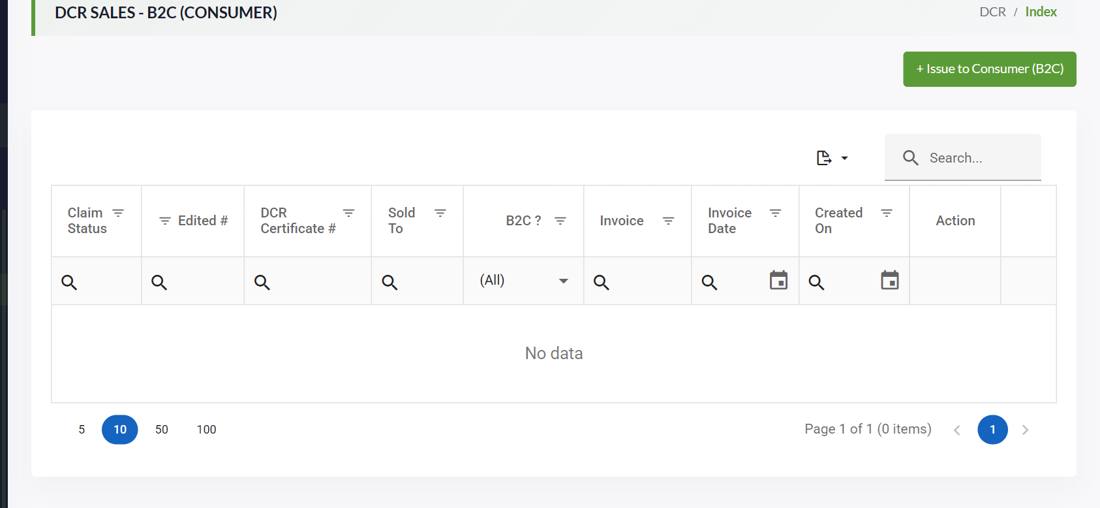
- On the DCR portal open DCR > Sell (B2C - Consumer), search the application number and press Edit.
- Remove the wrong panel, add the right one (it must be in your stock) and save. Then the consumer submits it again on PM Surya Ghar.
B2C Claimed Update PanelsWrite: Only if the edit is refused after un-claiming: the certificate number and a screenshot of the error.
Q2Please cancel or delete a certificate made by mistake.
- Un-Claimed: DCR > Sell, search the certificate, press Edit and correct the buyer, invoice or panels.
- Claimed by a company: ask the buyer to press Return in their DCR > Claimed list. The panels come back to your stock and you can issue a new certificate.
- A buyer who no longer wants the goods but cannot return them: upload the buyer's letter in a ticket; nothing is reversed without the buyer's confirmation.
Cerificate Return/Cancel B2BWrite: Certificate number and the buyer's letter.
Q3The buyer has claimed a B2B certificate with a wrong name, GST, invoice number or date.
- Buyer: DCR > Claimed > Return on that certificate.
- You: the panels are back in your stock as a returned lot. Issue a new B2B certificate; its date must be on or after the return date.
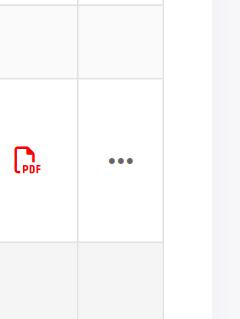
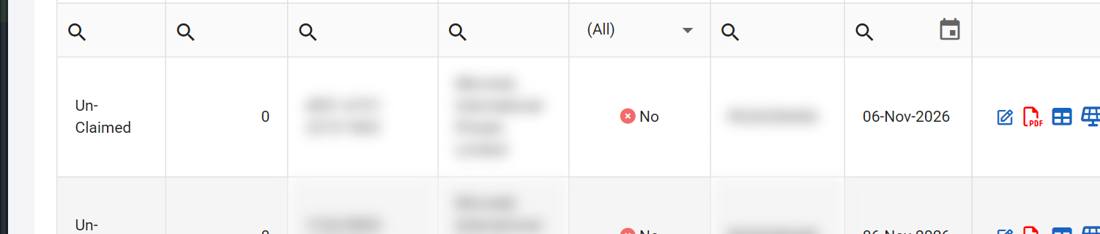
Q4How do I edit an Un-Claimed certificate?
- You can change the buyer, address, invoice and the panels.
- After the second edit the Edit icon is gone; support cannot open it again.
Q5Panels returned by my buyer do not show in my stock.
- Check who issued the certificate that was returned. If the panels were sold on by a reseller, they went back to that reseller.
- In your new certificate choose a date after the return; an earlier date says the panel is not in stock.
Q6The address on the certificate is wrong.
- Un-Claimed: edit the certificate and select the right buyer branch by its GST number.
- The buyer has no branch at that address? The buyer adds it in their own Branch list first.
- A new company name or GST of your own company needs a ticket with the GST certificate.
Update/Change Customer Information in CertificateWrite: Certificate number and the GST certificate.
Wrong Wp (wattage) on panels22% of tickets
A wrong module item chosen in Cell to Module is the second most common ticket.
Q7We chose the wrong Wp in Cell to Module. The panels are not sold yet.
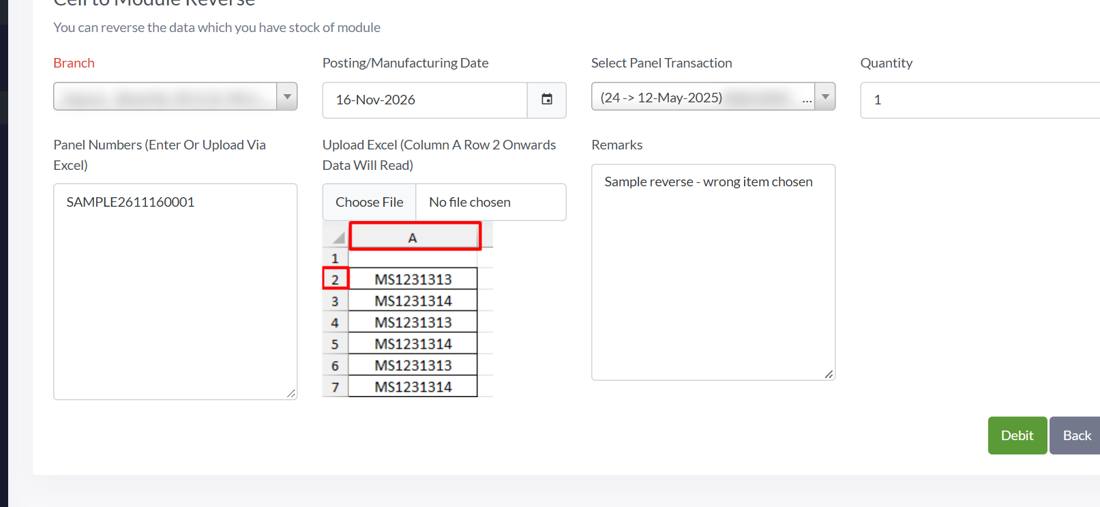
- DCR > Internal Stock Credit > Cell to Module (Reverse): branch, date, the conversion, quantity and serial numbers, Debit.
- The cells go back to the same cell entry and the serial numbers are free again.
- Cell to Module again with the right module item and the same serial numbers.
Q8The Wp is wrong and the certificate is already made. Please correct it.
- Create the correct module item first if you do not have it.
- Attach an Excel of the serial numbers and write the certificate number, the item code used and the correct item code with its Wp.
- Support shows you the lot and asks you to confirm the change for all its panels.
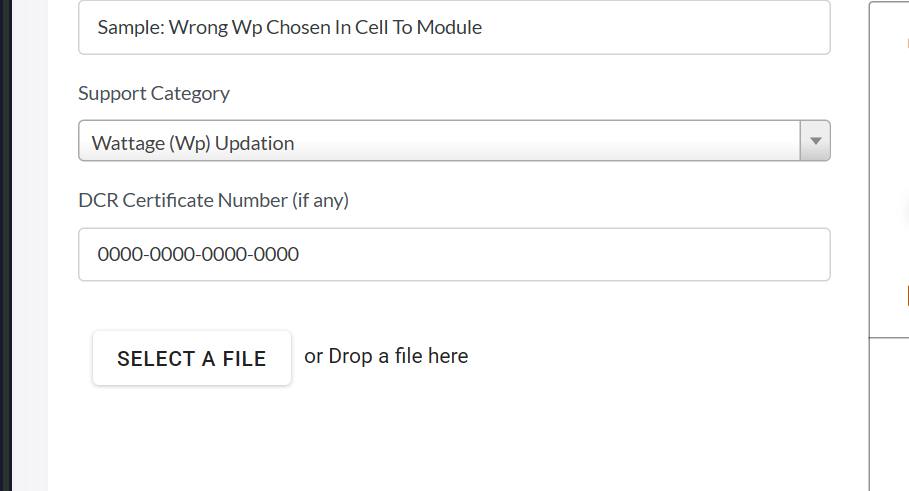
Wattage (Wp) UpdationWrite: Certificate number, Excel of serial numbers, used and correct item code.
Q9Only some panels of the lot have the wrong Wp. Can you change just those?
- Panels of that lot still in stock: reverse only those and convert them again with the right item.
- Make each Cell to Module entry for one Wp only, so a mistake affects only that lot.
Q10Please change the Wp from lower to higher, for example 550 to 555 Wp.
- If the panels are still in stock, reverse and convert again with the higher item; the Wp check decides if the cells allow it.
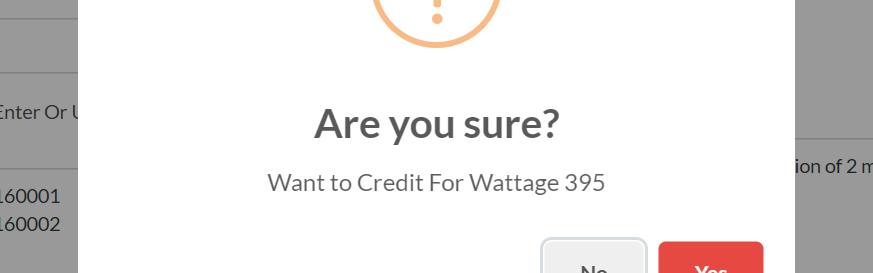
- Always check the wattage in the confirm window before pressing Yes.
Cell to Module16% of tickets
The Wp check, missing cell entries and the automatic Cell Adjust.
Q11Cell to Module says WP Validation Failed.
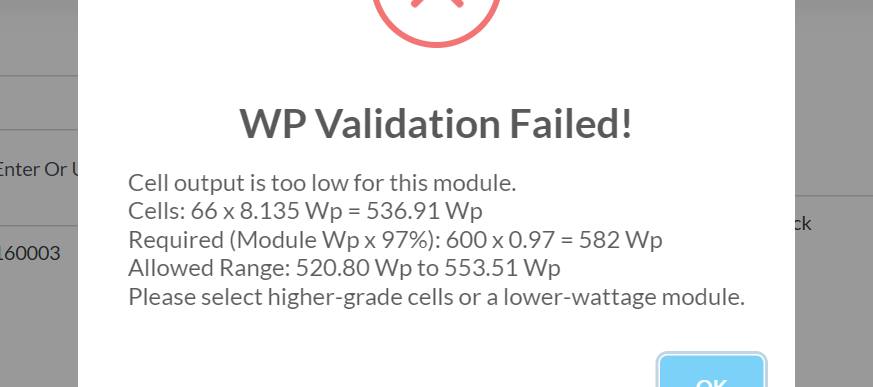
- Example: 72 cells of 7.6 Wp = 547.2 Wp. These cells make modules from 530.78 to 564.12 Wp.
- The window shows the allowed range for your cells. Choose a module item inside it, or a cell entry with higher Wp cells.
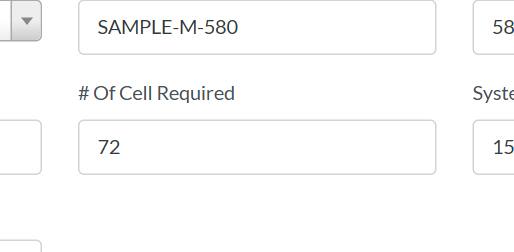
- Check Cell Required of the item: full cells per module, 72 for a 144 half-cut module.
Q12Select Cell Transaction shows nothing, though we have cells.
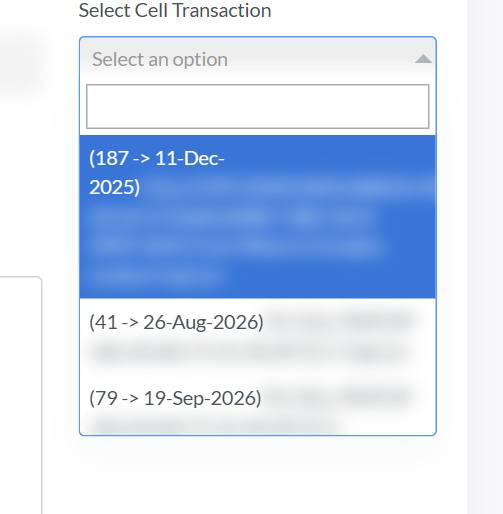
- Choose the module item first, then the cell entry.
- Check the technology of the item (TopCon, Mono Perc ...) against your cells in Stock Summary.
- Check the branch and that the posting date is not before the date the cells came in.
- Cells bought but not in stock: the cell certificate is still in DCR > Unclaimed; claim it.
Q13It says Cell to Module conversion is currently in progress.
- Agree inside your team who converts when, especially for large lots.
- Do not refresh or close the page while a conversion is saving.
Q14Our cell quantities moved to another entry by themselves (Cell Adjust).
- Matching means: same cell technology, efficiency and Wp within 2 percent, and the other entry holds at least 1,000 cells. The biggest such entry is used.
- You see a Cell Adjust debit on the small entry and a credit on the other; the remark names both entries with efficiency and Wp.
- The remark may still say less than 72: that is old wording, the rule now is fewer than 1,000.
Q15Please merge our small leftover cell lots into one.
- Entries of another technology, or with efficiency or Wp more than 2 percent apart, are never joined.
- No matching entry yet? The small balance stays and joins after a later conversion, or is sold as cells.
Q16We cannot create an item with 78 (or 64, 66 ...) cells.
- Items > Add Item > Item Type Solar Panels, then type the number; it cannot be 0.
- The module must be one of your ALMM-listed models.
- An item already used in a transaction cannot be changed; create a new item.
Q17We chose the wrong manufacturing date.
- The date cannot be in the future, and cannot be before the cells came into your stock.
Q18Cell to Module (Reverse) does not show the conversion or the panels.
- On an Un-Claimed certificate: edit the certificate to correct it.
- Returned panels: they are a returned lot; sell them again or use Scrapped Panel for damaged ones. They cannot become cells again.
- Choose the branch and a date on or after the conversion date.
Panel serial numbers and stock8% of tickets
Duplicates, panels not in stock and wrong numbers.
Q19Cell to Module says Duplicate Number Generation.
- The error table lists every refused number. Check for typing mistakes and extra characters.
- Use Search Panel on the dashboard to see where the number already is.
- Spaces and line breaks separate numbers; small letters are changed to capitals.
Q20The certificate says Panel is not in your stock, but the panel is ours.
- Check the branch: Stock Summary > panel icon shows which panels are in which branch.
- Check the date: not before the manufacturing, claim or return date of the panel.
- Search Panel shows if it was already sold, and to whom.
Panel Serial Number Not In StockWrite: Serial numbers, branch, date and the error screenshot.
Q21It says the panel is already added.
- Look at the table of added panels and remove the repeat.
Q22We typed a wrong serial number in Cell to Module.
- On an Un-Claimed certificate: edit the certificate to take it out first.
- Already claimed by a buyer: the buyer returns the certificate first. Returned panels cannot be reversed; they can be sold again.
Q23PM Surya Ghar says the serial number is a duplicate or repeated.
- On the DCR portal a serial number can exist only once; check it with Search Panel.
Company, users and Module Production Data8% of tickets
Company type, missing menus, logins and the production report.
Q24We are a module manufacturer but registered as a reseller.
- Not listed yet: get BIS and ALMM listing first.
- Make cells too and listed in ALMM List-II? Ask for Both Solar-Cells and Solar-Panels Manufacturer.
Company Profile UpdatingWrite: The ALMM list page with your company.
Q25Items, Warranty Certificate or Branch are missing from my menu.
- Cell to Module missing too? Your company type is not a module manufacturer (Q24). Log out and in again after a type change.
Q26What must we fill in Module Production Data?
- Module production only, DCR and non-DCR, in MWp up to 3 decimals; not cells, sales or stock.
- Save keeps a draft; Confirm locks for good.
- A registration missing, or a wrong figure confirmed: raise a ticket with the BIS number, year, month and proof.

Module Production DataWrite: BIS number, financial year, month and the production log.
Q27We are logged out again and again.
- Always press Logout when you finish.
- The portal also logs you out after 45 minutes without activity.
Q28How do we change the email or mobile of the main contact?
- Users > Add User, verify the new email with its OTP, tick Is Admin if needed.

Warranty certificate4% of tickets
When it is made and why a DCR certificate has none.
Q29Why is no warranty certificate printed with our DCR certificate?
- Your B2B buyer, or a reseller after it, issues the B2C certificate; the warranty certificate is made then, in your name as manufacturer.
- You see all of them in DCR > Warranty Certificate.
- Only panels get one, not cells.
Q30A reseller says the warranty is missing on its B2C certificate.
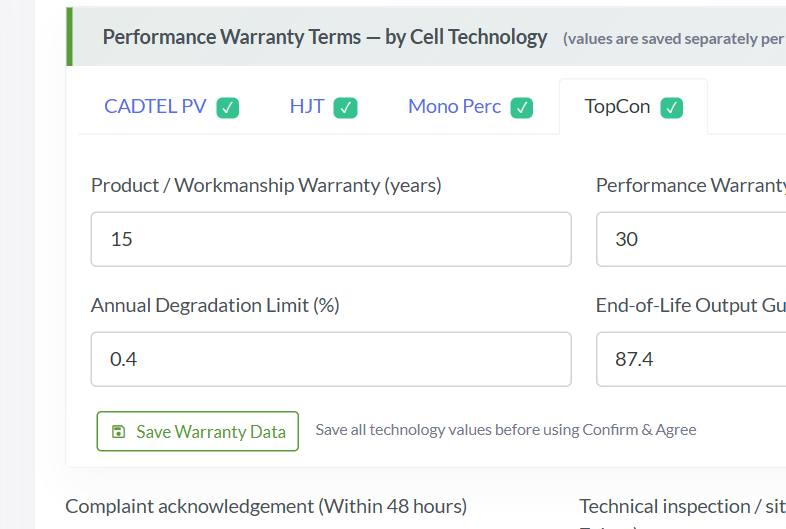
- Admin: open Warranty Certificate, save the values of every cell technology tab, fill the service times and press Confirm and Agree.
- From then on the warranty certificate is made with every B2C certificate of your panels.
Q31A Warranty Certificate Required message appears after every login.
- Save Warranty Data on every technology tab before Confirm and Agree; an unsaved tab blocks it.
Q32Please change our warranty years, or switch the warranty certificate off.
- Write exactly which values change, for which cell technology.
- Minimums: product warranty 10 years, performance warranty 25 years.
Warranty CertificateWrite: The values to change and the cell technology.
NDCR (non-DCR) modules4% of tickets
Purchases, cell items and selling outside DCR.
Q33How do we make and sell NDCR modules?
- Create Solar Cells NDCR and Solar Panels NDCR items first (Items > Add Item).
- Cells bought from an Indian maker on an NDCR certificate: claim it in NDCR > Unclaimed instead of Cell Purchase.
- NDCR and DCR stock never mix.

Q34We typed a wrong quantity in an NDCR cell purchase.
- Check the zeros before saving; NDCR purchases are available at once, without approval.
Transaction IssueWrite: Invoice number, wrong and correct quantity, the invoice.
Q35Our NDCR cell purchase shows 0 kW.
- NDCR > Self Credit > Wafer to Cell: branch, purchase invoice, date, NDCR cell item and quantity.
Which category to choose for a ticket
| Problem | Support Category |
|---|---|
| Add or remove panels on a claimed B2C certificate | B2C Claimed Update Panels |
| Wrong Wp after the certificate | Wattage (Wp) Updation |
| Buyer wants to return or cancel a B2B certificate | Cerificate Return/Cancel B2B |
| Panel not in stock | Panel Serial Number Not In Stock |
| Cannot create a certificate | Cannot create DCR Certificate |
| Warranty certificate details | Warranty Certificate |
| Capacity or production figures | Module Production Data |
| Company type, name or GST | Company Profile Updating |
| Anything else | General Query / Others |
Need help? DCR support 7041452290 (Mon-Sat, 9:30 AM - 7:00 PM) | support@dcrverificationportal.com
सूची में अपनी समस्या ढूँढें, हरे बॉक्स में तुरंत जवाब पढ़ें और स्टेप करें। फिर भी अटके हैं? दी गई श्रेणी के साथ टिकट डालें।
पिछले 180 दिनों में मॉड्यूल निर्माताओं के सपोर्ट टिकट (मॉड्यूल के काम से जुड़े लगभग 410) से बनाया गया। भाग उसी क्रम में हैं जितनी बार पूछे गए।
सर्टिफिकेट एडिट करना, लौटाना और रद्द करना33% टिकट
क्लेम हुए B2C सर्टिफिकेट पर गलत सीरियल नंबर सबसे आम टिकट है।
प्र1B2C सर्टिफिकेट से एक सीरियल नंबर हटाकर दूसरा जोड़ना है।
- PM Surya Ghar पोर्टल पर उपभोक्ता का आवेदन खोलें, Installation चरण पर जाएं और DCR सर्टिफिकेट का Delete आइकन दबाएं।
- DCR पोर्टल पर DCR > Sell (B2C - Consumer) खोलें, आवेदन नंबर खोजें और Edit दबाएं।
- गलत पैनल हटाएं, सही जोड़ें (वह आपके स्टॉक में हो) और सेव करें। फिर उपभोक्ता उसे PM Surya Ghar पर दोबारा जमा करे।
B2C Claimed Update Panelsलिखें: केवल अगर अन-क्लेम के बाद भी एडिट अस्वीकार हो: सर्टिफिकेट नंबर और एरर का स्क्रीनशॉट।
प्र2गलती से बना सर्टिफिकेट रद्द या डिलीट कर दें।
- Un-Claimed: DCR > Sell, सर्टिफिकेट खोजें, Edit दबाएं और खरीदार, इनवॉइस या पैनल सुधारें।
- किसी कंपनी ने क्लेम किया: खरीदार से उनकी DCR > Claimed सूची में Return दबाने को कहें। पैनल आपके स्टॉक में लौटते हैं और आप नया सर्टिफिकेट जारी कर सकते हैं।
- खरीदार अब माल नहीं चाहता पर लौटा नहीं सकता: टिकट में खरीदार का पत्र अपलोड करें; खरीदार की पुष्टि के बिना कुछ वापस नहीं होता।
Cerificate Return/Cancel B2Bलिखें: सर्टिफिकेट नंबर और खरीदार का पत्र।
प्र3खरीदार ने गलत नाम, GST, इनवॉइस नंबर या तारीख वाला B2B सर्टिफिकेट क्लेम कर लिया।
- खरीदार: उस सर्टिफिकेट पर DCR > Claimed > Return।
- आप: पैनल लौटे लॉट के रूप में आपके स्टॉक में हैं। नया B2B सर्टिफिकेट जारी करें; उसकी तारीख वापसी की तारीख या उसके बाद की हो।
प्र4Un-Claimed सर्टिफिकेट कैसे एडिट करूँ?
- आप खरीदार, पता, इनवॉइस और पैनल बदल सकते हैं।
- दूसरे एडिट के बाद Edit आइकन चला जाता है; सपोर्ट उसे फिर नहीं खोल सकता।
प्र5मेरे खरीदार के लौटाए पैनल मेरे स्टॉक में नहीं दिखते।
- जाँचें कि लौटाया गया सर्टिफिकेट किसने जारी किया। अगर पैनल किसी रीसेलर ने आगे बेचे थे, तो वे उसी रीसेलर को लौटे।
- नए सर्टिफिकेट में वापसी के बाद की तारीख चुनें; पहले की तारीख पर पैनल स्टॉक में नहीं दिखता।
प्र6सर्टिफिकेट पर पता गलत है।
- Un-Claimed: सर्टिफिकेट एडिट करें और GST नंबर से खरीदार की सही ब्रांच चुनें।
- खरीदार की उस पते पर ब्रांच नहीं? खरीदार पहले अपनी Branch सूची में उसे जोड़े।
- आपकी अपनी कंपनी का नया नाम या GST बदलने के लिए GST सर्टिफिकेट के साथ टिकट चाहिए।
Update/Change Customer Information in Certificateलिखें: सर्टिफिकेट नंबर और GST सर्टिफिकेट।
पैनल पर गलत Wp (वॉटेज)22% टिकट
Cell to Module में गलत मॉड्यूल आइटम चुनना दूसरा सबसे आम टिकट है।
प्र7Cell to Module में गलत Wp चुन लिया। पैनल अभी बिके नहीं।
- DCR > Internal Stock Credit > Cell to Module (Reverse): ब्रांच, तारीख, कन्वर्ज़न, मात्रा और सीरियल नंबर, Debit।
- सेल उसी सेल एंट्री में लौटते हैं और सीरियल नंबर फिर से खाली हो जाते हैं।
- सही मॉड्यूल आइटम और उन्हीं सीरियल नंबर से दोबारा Cell to Module करें।
प्र8Wp गलत है और सर्टिफिकेट बन चुका है। कृपया सुधारें।
- सही मॉड्यूल आइटम न हो तो पहले बनाएं।
- सीरियल नंबर की Excel अटैच करें और सर्टिफिकेट नंबर, इस्तेमाल हुआ आइटम कोड और सही आइटम कोड उसके Wp के साथ लिखें।
- सपोर्ट आपको लॉट दिखाता है और उसके सभी पैनल के बदलाव की पुष्टि माँगता है।
Wattage (Wp) Updationलिखें: सर्टिफिकेट नंबर, सीरियल नंबर की Excel, इस्तेमाल हुआ और सही आइटम कोड।
प्र9लॉट के केवल कुछ पैनल का Wp गलत है। क्या केवल उन्हें बदल सकते हैं?
- उस लॉट के जो पैनल अभी स्टॉक में हैं: केवल उन्हें रिवर्स करें और सही आइटम से दोबारा कन्वर्ट करें।
- हर Cell to Module एंट्री केवल एक Wp की करें, ताकि गलती केवल उसी लॉट पर असर करे।
प्र10Wp नीचे से ऊपर बदलें, जैसे 550 से 555 Wp।
- अगर पैनल अभी स्टॉक में हैं तो रिवर्स करके ऊँचे आइटम से दोबारा कन्वर्ट करें; Wp जाँच तय करती है कि सेल इसकी अनुमति देते हैं या नहीं।
- Yes दबाने से पहले पुष्टि विंडो में वॉटेज हमेशा जाँचें।
Cell to Module16% टिकट
Wp जाँच, न दिखने वाली सेल एंट्री और अपने आप होने वाला Cell Adjust।
प्र11Cell to Module कहता है WP Validation Failed।
- उदाहरण: 7.6 Wp के 72 सेल = 547.2 Wp। इन सेल से 530.78 से 564.12 Wp तक के मॉड्यूल बनते हैं।
- विंडो आपके सेल के लिए अनुमत सीमा दिखाती है। उसके भीतर का मॉड्यूल आइटम चुनें, या ज़्यादा Wp वाले सेल की एंट्री।
- आइटम का Cell Required जाँचें: एक मॉड्यूल में पूरे सेल, 144 हाफ़-कट मॉड्यूल के लिए 72।
प्र12हमारे पास सेल हैं, फिर भी Select Cell Transaction में कुछ नहीं दिखता।
- पहले मॉड्यूल आइटम चुनें, फिर सेल एंट्री।
- आइटम की टेक्नोलॉजी (TopCon, Mono Perc ...) को Stock Summary में अपने सेल से मिलाएं।
- ब्रांच जाँचें और कि पोस्टिंग तारीख सेल आने की तारीख से पहले की न हो।
- सेल खरीदे पर स्टॉक में नहीं: सेल का सर्टिफिकेट अभी DCR > Unclaimed में है; उसे क्लेम करें।
प्र13लिखा आता है Cell to Module conversion is currently in progress।
- अपनी टीम में तय करें कि कौन कब कन्वर्ट करेगा, ख़ासकर बड़े लॉट के लिए।
- कन्वर्ज़न सेव होते समय पेज रिफ़्रेश या बंद न करें।
प्र14हमारे सेल अपने आप दूसरी एंट्री में चले गए (Cell Adjust)।
- मेल खाना मतलब: वही सेल टेक्नोलॉजी, 2 प्रतिशत के भीतर एफ़िशिएंसी और Wp, और दूसरी एंट्री में कम से कम 1,000 सेल। ऐसी सबसे बड़ी एंट्री ली जाती है।
- छोटी एंट्री पर Cell Adjust डेबिट और दूसरी पर क्रेडिट दिखता है; टिप्पणी में दोनों एंट्री एफ़िशिएंसी और Wp के साथ हैं।
- टिप्पणी में अब भी less than 72 लिखा हो सकता है: यह पुराना शब्द है, अब नियम 1,000 से कम का है।
प्र15हमारे छोटे बचे सेल लॉट एक में मिला दें।
- दूसरी टेक्नोलॉजी की, या 2 प्रतिशत से ज़्यादा अलग एफ़िशिएंसी या Wp वाली एंट्री कभी नहीं जुड़तीं।
- अभी मेल खाती एंट्री नहीं? छोटा बैलेंस रहता है और बाद के कन्वर्ज़न के बाद जुड़ता है, या सेल के रूप में बिकता है।
प्र16हम 78 (या 64, 66 ...) सेल वाला आइटम नहीं बना पा रहे।
- Items > Add Item > Item Type Solar Panels, फिर संख्या लिखें; यह 0 नहीं हो सकती।
- मॉड्यूल आपके ALMM-सूचीबद्ध मॉडल में से हो।
- ट्रांज़ैक्शन में इस्तेमाल हुआ आइटम बदला नहीं जा सकता; नया आइटम बनाएं।
प्र17हमने गलत मैन्युफ़ैक्चरिंग तारीख चुन ली।
- तारीख आगे की नहीं हो सकती, और सेल आपके स्टॉक में आने से पहले की नहीं हो सकती।
प्र18Cell to Module (Reverse) में कन्वर्ज़न या पैनल नहीं दिखते।
- Un-Claimed सर्टिफिकेट पर: सर्टिफिकेट एडिट करके सुधारें।
- लौटे पैनल: ये लौटा लॉट हैं; इन्हें फिर बेचें या खराब के लिए Scrapped Panel इस्तेमाल करें। ये फिर सेल नहीं बन सकते।
- ब्रांच और कन्वर्ज़न की तारीख या उसके बाद की तारीख चुनें।
पैनल सीरियल नंबर और स्टॉक8% टिकट
डुप्लीकेट, स्टॉक में न दिखने वाले पैनल और गलत नंबर।
प्र19Cell to Module कहता है Duplicate Number Generation।
- एरर तालिका हर अस्वीकार नंबर दिखाती है। टाइपिंग की गलती और अतिरिक्त अक्षर जाँचें।
- नंबर पहले से कहाँ है, यह डैशबोर्ड के Search Panel से देखें।
- स्पेस और नई लाइन नंबर अलग करते हैं; छोटे अक्षर बड़े हो जाते हैं।
प्र20सर्टिफिकेट कहता है Panel is not in your stock, पर पैनल हमारा है।
- ब्रांच जाँचें: Stock Summary > पैनल आइकन दिखाता है कौन सा पैनल किस ब्रांच में है।
- तारीख जाँचें: पैनल की मैन्युफ़ैक्चरिंग, क्लेम या वापसी की तारीख से पहले नहीं।
- Search Panel दिखाता है कि यह पहले बिक चुका है या नहीं, और किसे।
Panel Serial Number Not In Stockलिखें: सीरियल नंबर, ब्रांच, तारीख और एरर का स्क्रीनशॉट।
प्र21लिखा आता है कि पैनल पहले से जोड़ा गया है।
- जोड़े गए पैनल की तालिका देखें और दोहराव हटाएं।
प्र22हमने Cell to Module में गलत सीरियल नंबर लिख दिया।
- Un-Claimed सर्टिफिकेट पर: पहले सर्टिफिकेट एडिट करके उसे निकालें।
- खरीदार ने क्लेम कर लिया: पहले खरीदार सर्टिफिकेट लौटाए। लौटे पैनल रिवर्स नहीं होते; उन्हें फिर बेचा जा सकता है।
प्र23PM Surya Ghar कहता है सीरियल नंबर डुप्लीकेट या दोहराया है।
- DCR पोर्टल पर एक सीरियल नंबर केवल एक बार हो सकता है; Search Panel से जाँचें।
कंपनी, यूज़र और Module Production Data8% टिकट
कंपनी टाइप, न दिखने वाले मेनू, लॉगिन और उत्पादन रिपोर्ट।
प्र24हम मॉड्यूल निर्माता हैं पर रीसेलर के रूप में पंजीकृत हैं।
- अभी सूचीबद्ध नहीं: पहले BIS और ALMM लिस्टिंग लें।
- सेल भी बनाते हैं और ALMM List-II में हैं? Both Solar-Cells and Solar-Panels Manufacturer माँगें।
Company Profile Updatingलिखें: आपकी कंपनी वाला ALMM सूची का पेज।
प्र25मेरे मेनू में Items, Warranty Certificate या Branch नहीं है।
- Cell to Module भी नहीं? आपका कंपनी टाइप मॉड्यूल निर्माता नहीं है (Q24)। टाइप बदलने के बाद लॉग आउट करके फिर लॉगिन करें।
प्र26Module Production Data में क्या भरना है?
- केवल मॉड्यूल उत्पादन, DCR और नॉन-DCR, MWp में 3 दशमलव तक; सेल, बिक्री या स्टॉक नहीं।
- Save ड्राफ़्ट रखता है; Confirm हमेशा के लिए लॉक करता है।
- कोई पंजीकरण नहीं दिख रहा, या गलत आँकड़ा कन्फ़र्म हुआ: BIS नंबर, वर्ष, महीना और प्रमाण के साथ टिकट डालें।
Module Production Dataलिखें: BIS नंबर, वित्तीय वर्ष, महीना और प्रोडक्शन लॉग।
प्र27हम बार-बार लॉग आउट हो जाते हैं।
- काम पूरा होने पर हमेशा Logout दबाएं।
- 45 मिनट कोई काम न करने पर भी पोर्टल लॉग आउट कर देता है।
प्र28मुख्य संपर्क का ईमेल या मोबाइल कैसे बदलें?
- Users > Add User, नए ईमेल की OTP से पुष्टि करें, ज़रूरत हो तो Is Admin टिक करें।
वारंटी सर्टिफिकेट4% टिकट
यह कब बनता है और DCR सर्टिफिकेट के साथ क्यों नहीं।
प्र29हमारे DCR सर्टिफिकेट के साथ वारंटी सर्टिफिकेट क्यों नहीं छपता?
- आपका B2B खरीदार, या उसके बाद कोई रीसेलर, B2C सर्टिफिकेट जारी करता है; वारंटी सर्टिफिकेट तब बनता है, निर्माता के रूप में आपके नाम से।
- आप उन सबको DCR > Warranty Certificate में देखते हैं।
- यह केवल पैनल का बनता है, सेल का नहीं।
प्र30एक रीसेलर कहता है उसके B2C सर्टिफिकेट पर वारंटी नहीं है।
- एडमिन: Warranty Certificate खोलें, हर सेल टेक्नोलॉजी टैब के मान सेव करें, सर्विस समय भरें और Confirm & Agree दबाएं।
- उसके बाद आपके पैनल के हर B2C सर्टिफिकेट के साथ वारंटी सर्टिफिकेट बनता है।
प्र31हर लॉगिन के बाद Warranty Certificate Required संदेश आता है।
- Confirm & Agree से पहले हर टेक्नोलॉजी टैब पर Save Warranty Data करें; बिना सेव टैब इसे रोकता है।
प्र32हमारी वारंटी के साल बदलें, या वारंटी सर्टिफिकेट बंद करें।
- ठीक-ठीक लिखें कौन से मान बदलने हैं, किस सेल टेक्नोलॉजी के लिए।
- न्यूनतम: प्रोडक्ट वारंटी 10 साल, परफ़ॉर्मेंस वारंटी 25 साल।
Warranty Certificateलिखें: बदलने वाले मान और सेल टेक्नोलॉजी।
NDCR (नॉन-DCR) मॉड्यूल4% टिकट
DCR के बाहर खरीद, सेल आइटम और बिक्री।
प्र33NDCR मॉड्यूल कैसे बनाएं और बेचें?
- पहले Solar Cells NDCR और Solar Panels NDCR आइटम बनाएं (Items > Add Item)।
- किसी भारतीय निर्माता से NDCR सर्टिफिकेट पर खरीदे सेल: Cell Purchase के बजाय NDCR > Unclaimed में क्लेम करें।
- NDCR और DCR स्टॉक कभी नहीं मिलते।
प्र34NDCR सेल खरीद में गलत मात्रा लिख दी।
- सेव करने से पहले शून्य जाँचें; NDCR खरीद बिना मंज़ूरी तुरंत उपलब्ध होती है।
Transaction Issueलिखें: इनवॉइस नंबर, गलत और सही मात्रा, इनवॉइस।
प्र35हमारी NDCR सेल खरीद 0 kW दिखाती है।
- NDCR > Self Credit > Wafer to Cell: ब्रांच, खरीद इनवॉइस, तारीख, NDCR सेल आइटम और मात्रा।
टिकट के लिए कौन सी श्रेणी चुनें
| समस्या | Support Category |
|---|---|
| क्लेम हुए B2C सर्टिफिकेट में पैनल जोड़ना या हटाना | B2C Claimed Update Panels |
| सर्टिफिकेट के बाद गलत Wp | Wattage (Wp) Updation |
| खरीदार B2B सर्टिफिकेट लौटाना या रद्द करना चाहता है | Cerificate Return/Cancel B2B |
| पैनल स्टॉक में नहीं | Panel Serial Number Not In Stock |
| सर्टिफिकेट नहीं बन रहा | Cannot create DCR Certificate |
| वारंटी सर्टिफिकेट जानकारी | Warranty Certificate |
| क्षमता या उत्पादन के आँकड़े | Module Production Data |
| कंपनी टाइप, नाम या GST | Company Profile Updating |
| कुछ और | General Query / Others |
सहायता चाहिए? DCR सपोर्ट 7041452290 (सोम-शनि, सुबह 9:30 - शाम 7:00) | support@dcrverificationportal.com